Showing posts with label adobe lightroom. Show all posts

Friday, May 4, 2012

Adobe Lightroom 4

I was really stoked after collecting my package at the distributor in Sunway Damansara.
This might be old news, but it's been a month since I bought myself Adobe Lightroom 4. I've been testing out the beta version for a while and once the full version was released I couldn't believe how affordable it was. I got it for RM 505 through The Network Hub Sdn Bhd, who is one of Adobe's Gold Distributor as listed on Adobe's website.

What I like about Adobe Lightroom 4.
Although you can be content if you still have Lightroom 3 at hand, having Lightroom 4 does give you some edge in processing your images.
  1. Better shadows & highlights rescue than LR3. I shoot a lot of high key portraits on a white cyc. It's easier to clean-up the highlights in LR4.
  2. More options on the adjustment tools (gradient and brush tool). More control on highlights, colour, saturation, clarity and almost all of the basic editing variables are also available on the adjustment tools to be tweaked, hence more control.
  3. Superb noise reduction. I shot an ISO 2500 image and it did wonders in cleaning up the noise.
  4. More stable tethering than LR3.
If you're interested to learn more about Adobe Lightroom 4, why don't you attend "The Ultimate Lightroom Workflow" , a 3-day workshop by Jared Platt all the way, LIVE from Seattle via the internet, from 14-JUN till 16-JUN. It's FREE!

More info at:
http://www.creativelive.com/courses/ultimate-lightroom-4-workflow-jared-platt


Thursday, June 9, 2011

Register Now: 3-day Adobe Lightroom Workshop. RM24 Only!


Hello Friends,

I'm letting you know of this great opportunity to learn Adobe Lightroom for cheap! It's a 3-day workshop in a computer lab, for only RM24!

Why is it cheap?
This programme is subsidised by the Malaysian Government under the 1Malaysia Funds via local community colleges. In this case, it's being organised by Kolej Komuniti Klang.

Printed notes will be given.

All you need to bring are:
1. Some pen and paper
2. Some images you'd like to process in Lightroom during the exercise, approximately up to 300 images in thumb drive or portable drive that you'll connect to the computers.

We're looking for 20 participants.

Please register via the form below. Thank You and see you there!

Sunday, February 6, 2011

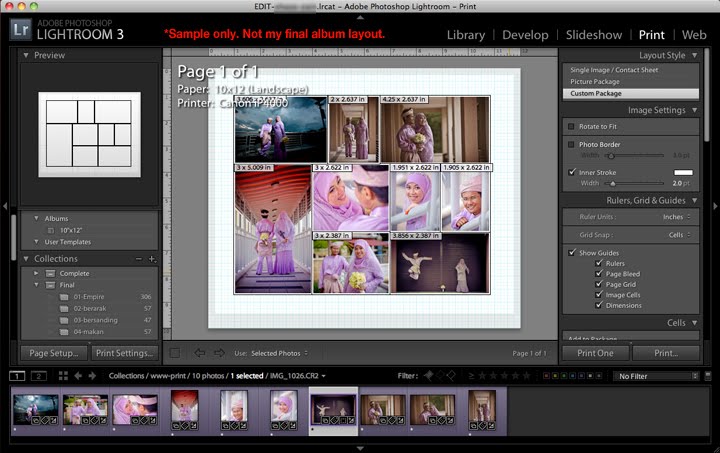
Did you know? Album layout in Lightroom 3.


Did you know that you can design a simple album layout in Lightroom 3 with the print module? Yes, this feature is great especially for wedding photographers. You can customise your page size and layout. You can even add multi-pages into your layout. For JPEG output, you can print to PDF and export the PDF into hi-res JPEGs to be sent to your printer.

First, set your page size by going to "Page Setup..." (bottom-left corner button). Then, on the "Layout" pull-down on the right panel, select "Custom Package". Then, drag and drop your images from your set collection onto the artboard. Resize, position and off you go! Be sure to check out the extra options on the right panel as you go down the list. Go ahead try it.

Friday, March 5, 2010

Simple Lightroom Workflow Seminar, 13 and 14-MAR-2010


Hello All!

I'm holding up my 2nd Simple Lightroom Workflow Seminar organised by Republik Studios.
Registrations are up on Republik Studios Facebook here at http://bit.ly/simplelightroomseminar

I'll be presenting this seminar on the 13th and 14th of March 2010, so come on whichever date is convenient for you. We appreciate if if you could please RSVP soon, so that we know how many Lightroom notes/booklets do we need to prepare.

If you love shooting but hate staring at the computer screen for post-processing, you should attend to find out how can you regain your freedom from tedious post-processing with the help of Adobe Lightroom.

See you there!


Venue
The Republik
20-2, Wangsa Delima 11
Wangsa Link, Wangsa Maju
53300, Kuala Lumpur, Malaysia

Tel: 03-4142 9653 or 016-346 8910 (Khairil)
Email: khairil@republikstudios.com

Map to Republik Studios Here:

View The Republik Studios in a larger map

Friday, May 22, 2009

FAQ for Simple Lightroom Seminar

Here are some FAQs for my upcoming Simple Lightroom Seminar

1. Q: Is a computer/laptop provided for participants in this seminar?
A: This is a seminar, not a workshop. Therefore, no computer/laptop is provided in this seminar. However, you're free to bring your own laptop if you wish. If you wish to bring a laptop, please install a trial version of Adobe Lightroom 2 available here.

Note: Although this is a seminar, I've designed a simple Lightroom Workflow System for wedding photographers that works. I should be simple enough to understand that you can try it at home. To those who wants to polish their Lightroom skills after this seminar, they can attend my Lightroom workshop in the future.

2. Q: Isn't 40 people too big for a seminar? Can I concentrate?
A: 40 people is small considering that this is a seminar. If you compare this to one of Malaysia's famous wedding photographer who held a few seminars at KLiUC with a capacity of 100 people plus, you'll notice how small this seminar is.

Regarding concentration, this workflow system is designed with simplicity in mind. A lot of people worry about the complexity of editing tools. Tools are simple, as long as you understand the concept and principal of any design tools/software. They're all almost the same. You're here to learn how to harness the tool in a systematic way to your advantage.

3. Q: Where is CADC Kompleks 3C Subang Jaya?
A: Map to the venue is here.

4. Q: How to register?
A: After making payment for the retainer, kindly email me your full name, telephone number and bank payment transaction reference with the subject "Simple Lightroom Seminar". It's easier for me to filter your emails with this subject.

Tuesday, May 19, 2009

Simple Lightroom Workflow Seminar now open for registration

Hello all,

I'm glad to announce a brand new "simple" seminar tailor-made to wedding photographers who have a day-job. Most of the part-time wedding photographers in Malaysia that I meet has this common problem, which is: "It takes too long to process the images".

This seminar will show you the "light" out of your current "darkness". You will soon know how to be able to free yourself from long nights of post-production and editing, and actually enjoy shooting more photographs without worrying about the editing process. More after this seminar ad below:

IMG:Simple Lightroom Workflow for Wedding Photographers

Typical situation of a part-time wedding photographer:

Saturday

9.00 am-12.00 pm: Shoot wedding event 1
5.00 pm-6.30 pm: Outdoor shoot
7.00 pm: Head home, transfer CF cards and sleep

Sunday
11.00 am-5.00 pm: Shoot wedding event 2 + Short Outdoor session
6.00 pm: Head home, transfer CF cards and catch-up on rest. Sleep.

Monday-Friday
9.00 am-6.00 pm: Work
6.00 pm-8.00 pm: Stuck in jam heading home.
8.00 pm-11.00 pm: Dinner, TV, family time with family
11.00 pm-12.00 am: Sit in front of the computer, surfing, checking mail, chat while photoshop is opened at the background.
12.00 am-2.00 am: Attempt to select and group some photos, edit a couple of photos and too tired and sleepy.
2.30 am: Sleep
6.00 am: Wake up and routine loops.

Now tell me, if this is your typical routine, when can you get your photos done? It's like burying yourself deeper into delaying your work. It gets frustrating over time and you've become de-motivated to even look at the photos you passionately shot over the weekend.

Revelation
What this seminar is going to show you is how to have a typical routine like this:

Saturday
9.00 am-12.00 pm: Shoot wedding event 1
5.00 pm-6.30 pm: Outdoor shoot
7.00 pm: Head home, transfer CF cards, have dinner, watch TV and spend some family time
10.00 pm-12.00 am: Select, sort and group images, process and apply editing effects, export to final edited files
12.01 am: reward yourself by surfing internet, reading, YM chat or sleep early.

Sunday
11.00 am-5.00 pm: Shoot wedding event 2 + Short Outdoor session
6.00 pm: Head home, transfer CF cards, have dinner, watch TV and spend some family time
10.00 pm-1.00 am: Select, sort and group images, process and apply editing effects, export to final edited files
1.01 am: reward yourself by surfing internet, reading, YM chat or sleep early.

All images processed!
Now you can choose how you want to spend your week.

If you'd like to know how to get back your life and escape the horror of editing wedding images during the weekdays, you will attend this seminar. You will see how easy it is to process 4-8 gigs of CF cards within the same night.

I will share with you a system that works for me, and insya'allah will work for you too.

To sign-up, please email me with the subject "Simple Lightroom Seminar" so that I can filter the emails easily. There are 40 seats available for each date of this seminar. The introductory price is RM150 only for these two dates. Next seminars will have the normal rate.

Payment terms
- RM50 retainer due before seminar date
- RM100 due on the seminar date

Maybank Account Details
Account name: AZHAR ARIFF
Account no.: 514365104584
Email: azhar.ariff@gmail.com

I will update your registration status on this post. Keep yourself updated.

Thanks for your support!

Registration List (Updated daily)
31-MAY-09 (Done succesfully! Thank you)
1. Nazri
2. Kyrol
3. Chita

13-JUN-09
1. Zaza/Haslizan Long
2. Kevin Rakesh
3. Vickneswaran
4. Khairi Jalil
4. Azri bin Nasruddin
6. Amru
7. Amru's friend
8. Mohd Salme Mohd Ali
9. Zubir
10. salina ismail
11. Noranizah Md .Isa
12. Bob
13. Zainuddin

ShareThis